ENG | Discovering uv tool for Python packaging
Modern Python packaging on Linux with uv — why pip3 is blocked on openSUSE (PEP 668), and how uv replaces pip, pipx and pyenv in one tool.
On openSUSE Slowroll/Tumbleweed installing or upgrading Python packages by pip3 no longer works, reason are documented in PEP 668 (Python Enhancement Proposal).
Also, I had recent experience with Python scripts executed as systemd services or by systemd timers that broke on update, which is another motivation and after all, I tried openSUSE to see how it solved breaking changes on rolling distro.
As noted above, Python 3.13 packages or tools such as yt-dlp (Youtube downloader) were impossible to update so I eventually deleted whole .local/lib/python3.13 folder and .local/bin which seemed to contain only Python tools.
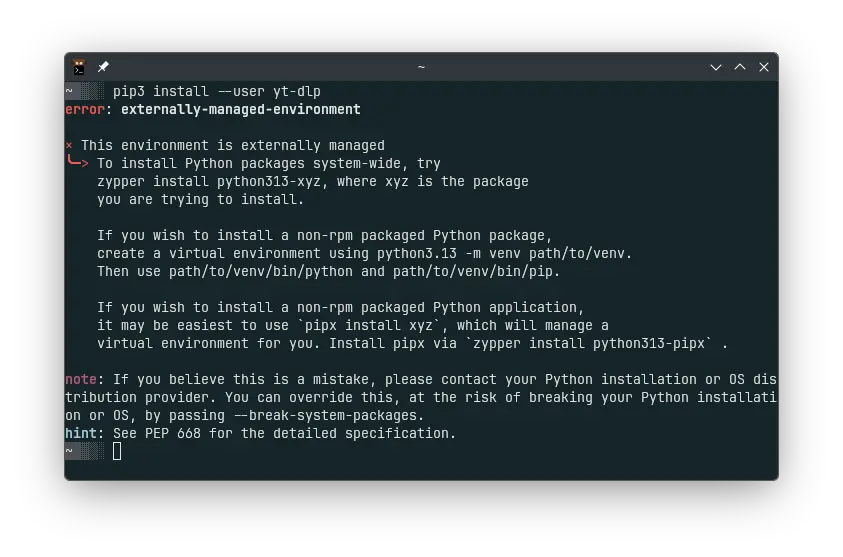
I was trying to ask various LLMs how to solve this problem, it seems that alternatives are
sudo zypper in python313-whateverexcept it’s system wide. Who knows how it survives a distribution upgrade.- Python virtual environment (
python3 -m venv ~/zephyrproject/.venv,source ~/zephyrproject/.venv/bin/activate,pip install west), which are fixed to certain Python version. - Python environment (pyenv) - never tried.
pipx- never tried.- Modern tool is
uvwritten in … wait for it … Rust. Never tried, let’s change it.
What is uv?
Package description says it
An extremely fast Python package and project manager, written in Rust.
Highlights:
- A single tool to replace pip, pip-tools, pipx, poetry, pyenv, twine, virtualenv, and more.
- 10-100x faster than pip.
- Provides comprehensive project management, with a universal lockfile.
- Runs scripts, with support for inline dependency metadata.
- Installs and manages Python versions.
- Runs and installs tools published as Python packages.
- Includes a pip-compatible interface for a performance boost with a familiar CLI.
- Supports Cargo-style workspaces for scalable projects.
- Disk-space efficient, with a global cache for dependency deduplication.

Trying uv
Horrible name for search. On Fedora it’s installed by sudo dnf in python3-uv and it’s a binary. On openSUSE it’s installed using sudo zypper in python313-uv and there is a symlink to /usr/bin/alts which is some openSUSE specific tool for resolving multiple versions.
On Windows it can be installed using winget install astral-sh.uv, it prints a few messages:
1
2
3
4
Path environment variable modified; restart your shell to use the new value.
Command line alias added: "uvx"
Command line alias added: "uv"
Command line alias added: "uvw"
Useful commands are
| Command | Description |
|---|---|
uv | Prints help |
uv python | Prints help for python command |
uv python list | Prints available (and installed) Python versions |
uv python install cpython-3.14.5-linux-x86_64 | Install Python 3.14.5 |
uv tool install mpremote | Installs MicroPython terminal tool to ~/.local/bin |
uv tool update --pre yt-dlp | Updates yt-dlp to pre-release/devel version |
uv venv --python 3.14 ~/.venvs/default/ | Create default virtual environment |
source ~/.venvs/default/bin/activate | Activate virtual environment |
uv pip install numpy | Installs numpy |
deactivate | Leave virtual environment |
Some of my questions
1/ Are virtual environments actually the reason why to use #!/usr/bin/env python3 instead of #!/usr/bin/python3?
Absolutely, because it resolves to correct Python inside virtual environment.
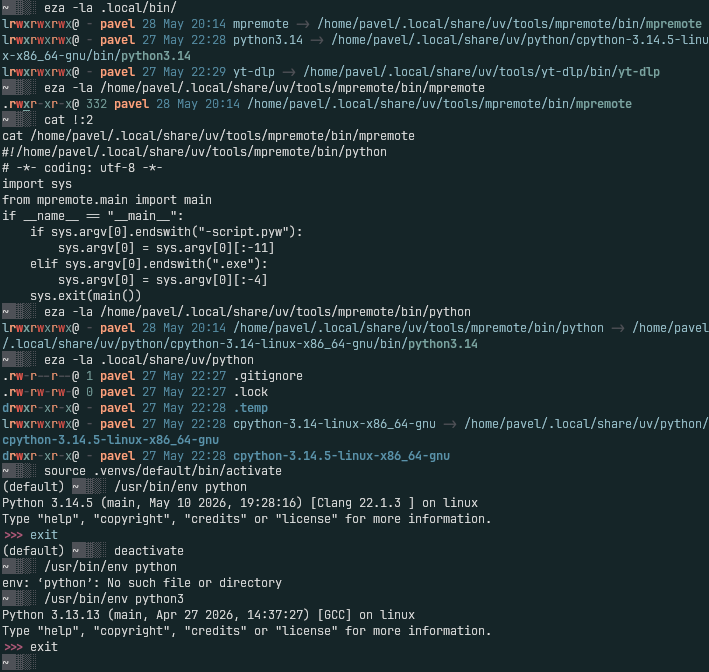
2/ Where are Python binaries and how does tools locate Python?
Environments contain symlinks to cache. Installed tools have path to Python hardcoded.
This is explained by a screenshot of symlinks and scripts in .local/bin directory
3/ How to run scripts from systemd (or outside of venv)?
This surpringly works if Python is executed with path a pointing into virtual environment as shown below code.
1
2
3
4
5
6
7
8
9
10
11
12
13
14
15
16
17
18
19
20
21
22
23
24
25
26
#!/usr/bin/env python3
import numpy as np
import matplotlib.pyplot as plt
import matplotlib.font_manager as fm

def magic_kernel(x):
    x = np.abs(x)
    return np.where(x <= 0.5, 0.75 - x**2,
           np.where(x <  1.5, 0.5 * (x - 1.5)**2, 0.0))

x = np.linspace(-2, 2, 500)
y = magic_kernel(x)

plt.style.use("dark_background")
plt.rcParams["font.family"] = "Iosevka"

fig, ax = plt.subplots(figsize=(6.4, 4.8))
ax.plot(x, y)
ax.set_title("Magic Kernel")
ax.grid(True, alpha=0.3)

fig.patch.set_alpha(0.0)
ax.patch.set_alpha(0.0)

plt.savefig("/tmp/test.png", dpi=100, bbox_inches="tight", transparent=True)
print("saved to /tmp/test.png")
1
2
3
4
5
6
7
8
9
10
~/devel$ nvim test.py

~/devel$ ./test.py
Traceback (most recent call last):
  File "/home/pavel/devel/./test.py", line 2, in <module>
    import numpy as np
ModuleNotFoundError: No module named 'numpy'

~/devel$ ~/.venvs/default/bin/python3 test.py
saved to /tmp/test.png
New project initialization
1
2
3
4
5
6
7
8
9
10
# Init project (only create `pyproject.toml`, no main.py hello world, no empty README.md)
# --bare is basically equivalent to --no-pin-python --no-readme --no-description
uv init --bare --name frostsim
# Add dependencies
uv add numpy opencv-python-headless scipy
# Optional (always use python 3.14 regardless of system version)
uv python 3.14
# Verify dependencies (also install them if not found)
uv run python -c "import numpy, cv2, scipy; print(numpy.__version__, cv2.__version__, scipy.__version__)"
# 2.4.6 4.13.0 1.17.1
Project deployment
This is the same on Windows and Linux. uv run python downloads and installs all dependencies and runs script. Example is from clean environment just after winget install astral-sh.uv and restart of terminal.
1
2
3
4
5
6
7
8
9
10
11
12
13
14
15
16
17
18
19
PS C:\dev-py> git clone https://github.com/pavel-perina/aurora.git
Cloning into 'aurora'...
remote: Enumerating objects: 22, done.
remote: Counting objects: 100% (22/22), done.
remote: Compressing objects: 100% (13/13), done.
remote: Total 22 (delta 8), reused 22 (delta 8), pack-reused 0 (from 0)
Receiving objects: 100% (22/22), 252.25 KiB | 2.38 MiB/s, done.
Resolving deltas: 100% (8/8), done.
PS C:\dev-py> cd .\aurora\
PS C:\dev-py\aurora> uv run aurora.py --fern --scene ember --size 3840x2160
Using CPython 3.14.5 interpreter at: C:\Users\pavel.perina\AppData\Local\Programs\Python\Python314\python.exe
Creating virtual environment at: .venv
Installed 3 packages in 652ms
rendering ember 3840x2160 ss=2
  bg+curtains    11.8s
  +sheets        29.6s
  +ferns         98.4s
  +glow/tone    130.0s
wrote aurora_ember_3840x2160.png
Scripts with dependencies
You can also use PEP 732 to define dependencies as script metadata instead of creating pyproject.toml.
1
2
3
# /// script
# dependencies = [ "tifffile", "numpy", "coloraide" ]
# ///
And then run script
1
uv run tools/colorize_mask.py mask.tif out.tif
Links
- Official page
- Dave Ebbelaar -=- Why Python Developers Are Switching to UV YouTube video showing more, for example how to set up projects and manage dependencies.
Summary
Switching to uv solved two things at once. First, it made PEP 668 a non-issue — instead of fighting the system, there is now a clean workflow that keeps system Python untouched and personal environments completely separate. Second, and more importantly, scripts running from systemd timers or services are no longer fragile. Pointing ExecStart at the venv interpreter directly means no breakage after a system update. The script runs exactly the Python it was written for, every time.
The speed is a nice bonus — Python 3.14, numpy and seaborn installed in roughly five seconds total is genuinely surprising the first time. But that is just quality of life. The reliability and Python versions managed by user are the actual win.
And there is more to explore: project management.
Demo screenshot
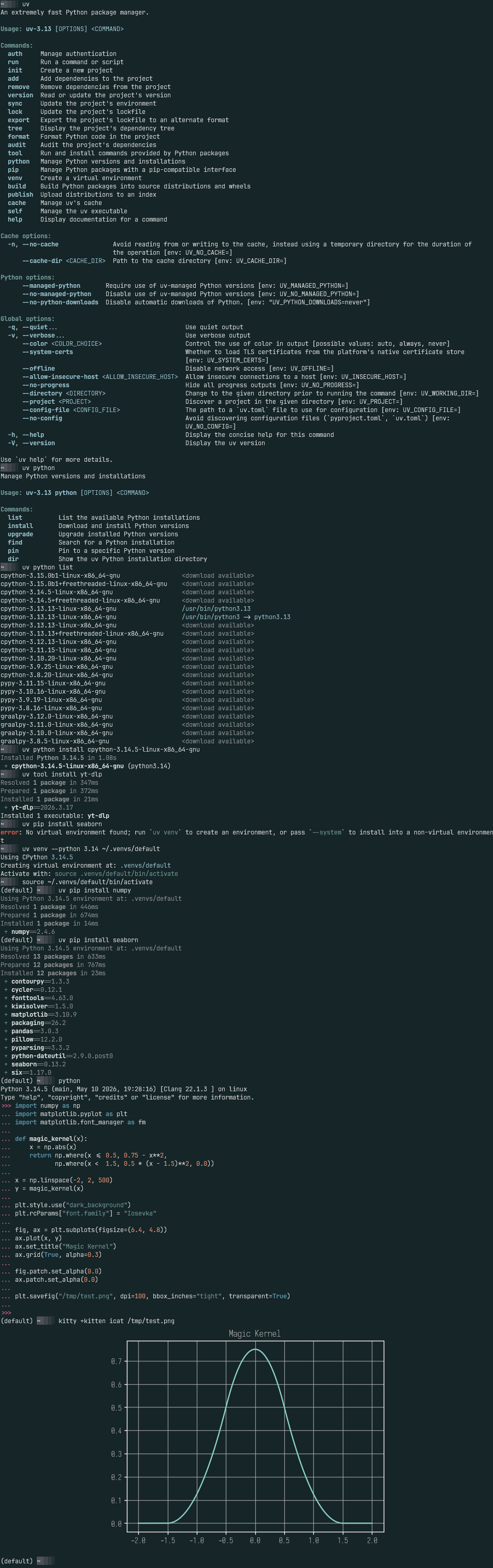 All in one screenshot of Kitty terminal from nothing to seaborn plot